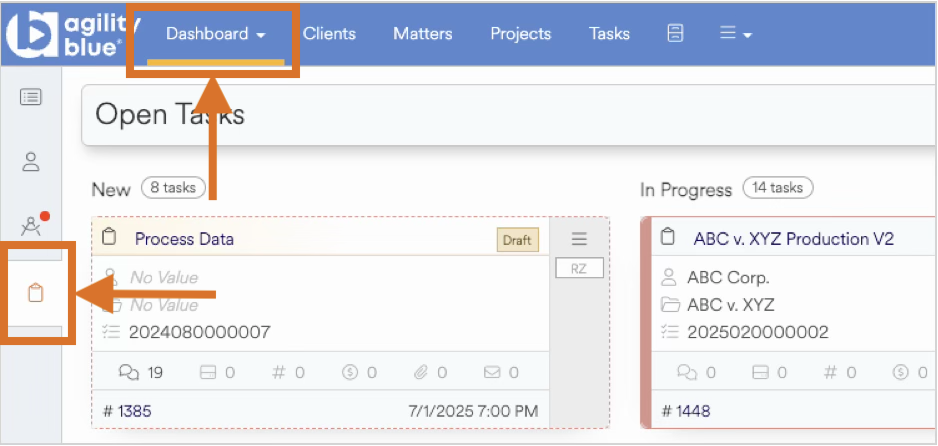
Agility Blue utilizes a Task Board view (also known as a Kanban board) to easily manage, assign and view open and completed Tasks. The Kanban view can be accessed from the Task Board dashboard and is available for task-level interactions.
What Is a Kanban Board?
A Kanban board is a visual workflow management method that makes it easy to see work as it moves through stages of completion. The approach originated in Japanese manufacturing and has since been widely adopted in software development, legal operations, and professional services.
At its core, a Kanban board displays work items, often called cards, organized into columns representing stages of a process. As work progresses, these cards move from left to right across the board. This simple, visual design helps teams manage workload, identify bottlenecks, and keep work flowing smoothly.
How Kanban Boards Work
Columns / Swimlanes
Each column represents a stage in your workflow. In Agility Blue, there are New, In Progress, and Completed Today. This gives teams an instant understanding of what needs attention and what’s already completed.
Cards / Tasks
Each task is represented as a card. In Agility Blue, cards contain details such as the task name, client & matter names, assignee, owner, requester, due date, and available actions.
Continuous Flow
Kanban focuses on moving work continuously through the workflow rather than batching tasks or waiting for scheduled intervals.
Pull-Based Work
Instead of assigning too much work upfront, team members pull new tasks only when they have capacity for them. This prevents overload and improves consistency.
Why Kanban Is Useful for Legal Project Work
Legal professionals deal with a constant flow of tasks such as intake requests, matter activities, deadlines, research items, document preparation, review cycles, and more. Kanban is especially effective in this environment because it provides:
Clear visibility across matters and projects
Real-time workload awareness, so teams know who is busy and what needs attention
A simple method for prioritization without needing complicated project plans
Early detection of bottlenecks, such as reviews piling up or waiting for client approval
Better collaboration across attorneys, paralegals, litigation support, and operations teams
Predictable workflows for recurring processes (e.g., discovery tasks, intake triage, task assignments)
Kanban’s simplicity makes it easy for legal teams to adopt without needing formal project management training.
The Agility Blue Task Board: A Kanban-Style View
Agility Blue includes a streamlined Kanban-style board called the Task Board, designed specifically for legal task management. It provides a clean interface that mirrors the familiar Kanban layout but is tailored to the way legal professionals work.
Our Three Swimlanes
Agility Blue displays tasks in three lanes:
.png)
New – Tasks that have been created but not yet assigned
In Progress – Tasks currently being worked on
Completed Today – Tasks completed within the current day for easy review and verification
As tasks advance through their lifecycle, they move from left to right. Assigning a task or completing a task causes the swimlane to automatically update its status in the system.
What You’ll See on Each Card
Cards on the Task Board typically show:
Task name
Assigned user
Priority or due date indicators
Client / matter / project association
Quick visual cues for urgency or blocked work
Automatic Tracking
When a task is moved or completed, Agility Blue updates all related dashboards, reports, and activity logs behind the scenes. This keeps your workflow aligned without needing manual updates.
How to Use the Task Board in Your Daily Workflow
Here’s how teams typically use the Task Board throughout the day:
Start Your Day
Review the New lane to see what’s been assigned or created since you last checked. Prioritize what needs immediate attention.
Work Through Tasks
Assigned tasks moved from New to into In Progress as you begin working on them. This gives your team visibility into your current workload.
Complete Tasks
Once a task is finished, it moves to Completed Today. This helps supervisors, project managers, or team leads quickly verify what was accomplished that day.
Filter for Focus
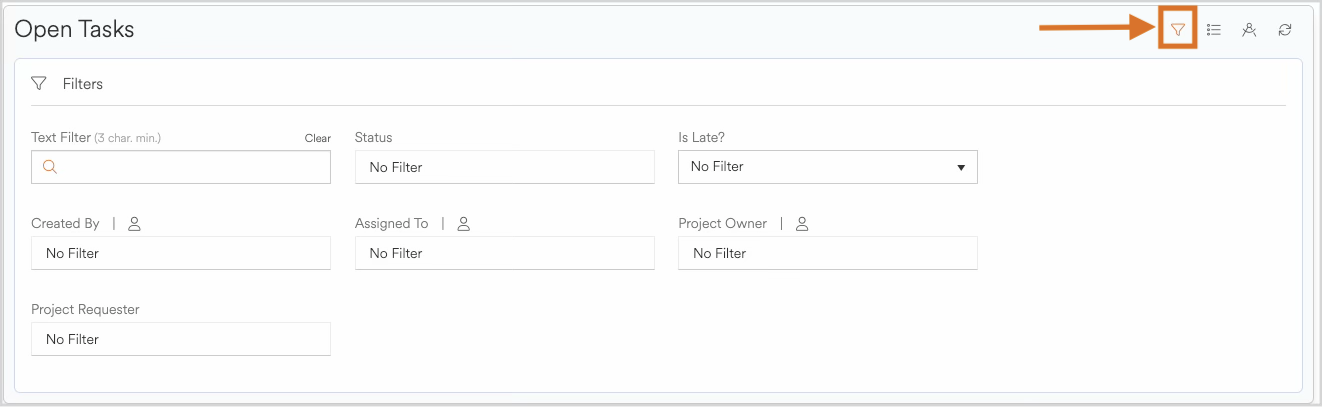
Use filters to narrow tasks by:
Text on any card
Task status
Is Late?
Task created by
Task assigned to
Project owner
Project requester
This allows individuals or teams to focus on exactly what matters at that moment.
Spot Bottlenecks
If you see a buildup of tasks in In Progress, it may indicate:
Too much work being started at once
Dependencies blocking progress
A resourcing issue
A potential delay that requires escalation
The visual layout makes these issues easy to identify early.
Best Practices for Getting the Most Out of Kanban in Agility Blue
Keep tasks concise so work can flow quickly.
Avoid starting too many tasks at once to prevent slowdowns.
Use task comments and attachments to keep context in one place.
Review the New lane frequently, especially during busy periods.
Schedule periodic stand-ups to review board status as a team.
Use completed-today tasks for end-of-day summaries or handoff notes.
Following these practices helps ensure smoother workflows and faster turnaround on legal work.
Summary
Kanban boards are a simple yet powerful way to visualize work and keep tasks moving. In Agility Blue, the Task Board provides a clear, intuitive snapshot of what needs attention, what’s currently in progress, and what’s been completed today. By adopting this approach, legal teams gain better visibility, faster response times, and more predictable workflows - all within a tool designed specifically for their needs.