Overview
Agility Blue allows users to send emails directly from within the platform, making it easy to communicate updates, request information, or share work with others.
Emails sent from Agility Blue are automatically linked to the relevant task or project, ensuring that all communication is captured and accessible in one place.
When You Send an Email
When an email is sent from a task within Agility Blue:
It is associated with the task or email conversation you are working in
A record of the message is stored within the workspace
Recipients receive the email just like any standard message
Future replies can be linked back to the same task or conversation
All emails in the thread are included
This ensures that communication remains organized and tied to the work it relates to.
.png)
Where Sent Emails Appear
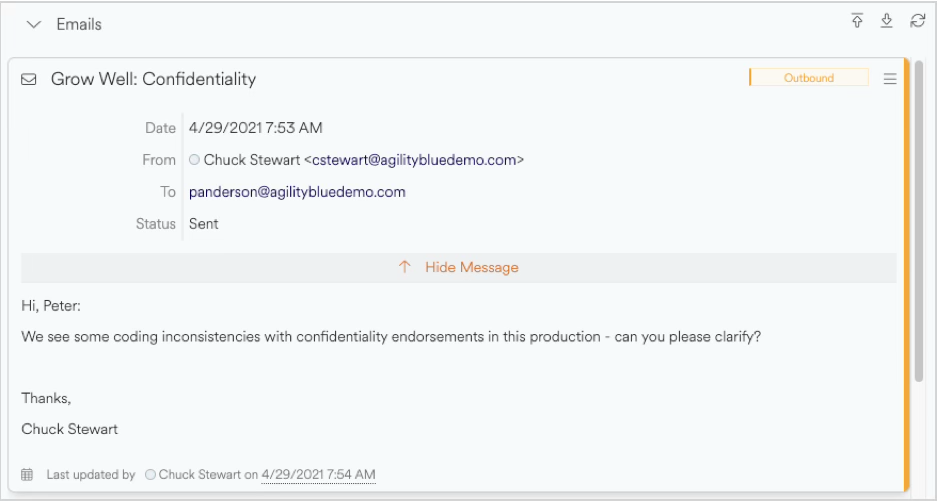
Sent emails are stored as part of the task’s email conversation thread within Agility Blue as part of the task’s activity and appear with an Outbound label.
This allows users to review past communication alongside the work itself.
How Replies Are Handled
Emails sent from Agility Blue include information that allows the system to recognize replies.
When a recipient responds:
The reply will be automatically added back to the correct task email conversation
The system attempts to maintain the continuity of the email thread
This makes it possible to manage entire conversations without leaving your email client.
Attachments and Recipients
When sending emails from Agility Blue:
Attachments can be included and are stored with the message and are also linked to the task’s attachments tab
To, CC, and BCC recipients are supported
Contacts will be automatically associated with the message
This ensures that all communication details are preserved and accessible.
Best Practices
To ensure smooth communication:
Use clear and descriptive subject lines
Include relevant recipients in the To or CC fields
Keep conversations within the same thread when possible
Use attachments to share supporting files instead of external links when appropriate
What to Expect
Most emails sent from Agility Blue behave just like standard emails. However, there are some noticeable differences:
The managed email address assigned to your organization is used for all outgoing communication. The email body will indicate who the email was from.
Replies are automatically linked back to the correct task or conversation
In some cases, replies may create new work if the system cannot confidently match them
When sending an outbound email from a task, the entire email conversation is included
All communication is captured and can be reviewed within Agility Blue.