Tasks in the Kanban view present a variety of information for quick inspection, navigation, and action:
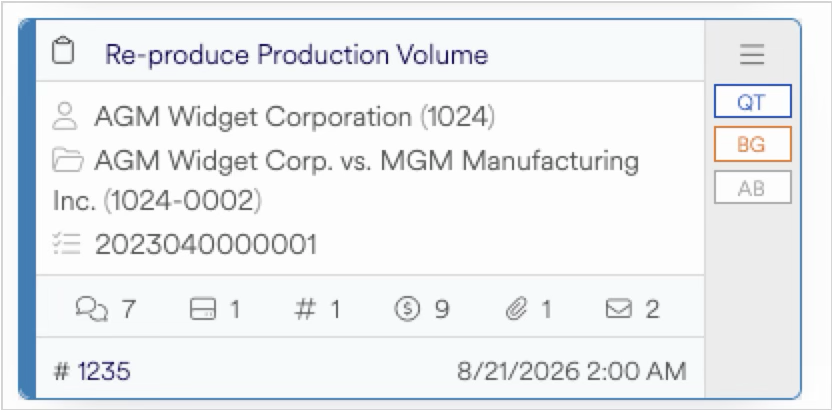
Task Name — The name given to the task
Client Name/Reference — The name and reference of the client associated with the matter and project
Matter Name/Reference — The name and reference of the matter associated with the project
Project ID number — The ID number of the project containing the task
Associated data totals — The number of comments, media log entries, volumes, billing entries, attachments, and emails associated with the task
Task ID number — The ID number given to the task
Due Date & Time — Date and time the task is due
Assignee — The initials of the individual assigned to the task. Hover over the initials to reveal the assignee’s full name.
Owner — The initials of the individual who owns the task. Hover over the initials to reveal the owner’s full name.
Requester — The initials of the individual who requested the task. Hover over the initials to reveal the requester’s full name.
Click on the 3 bars button at the top right of the task card to reveal the actions available for the task. For more detailed information, see the task card actions article.