How Task Timers Relate to Billing
Task timers are designed to capture time as work is performed, but they do not directly represent billable values.
Instead, timers act as the source of truth for elapsed time, which is later used to generate billing entries based on defined billing rules.
Each timer is tied to a specific task and Billing Type, ensuring that when time is converted into a billing entry, it follows the correct structure and pricing model.
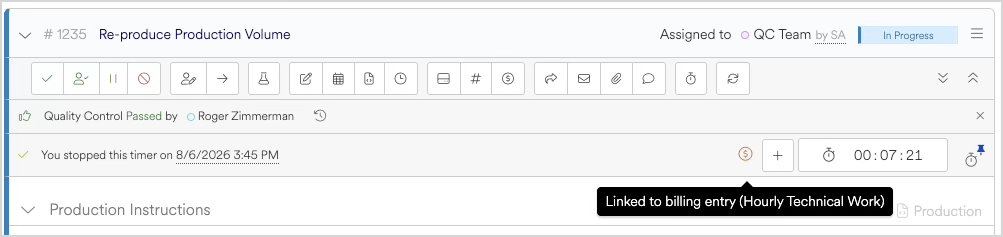
From Timer to Billing Entry
When a timer is stopped, Agility Blue uses the recorded time to prepare a billing entry.
By default, this process happens automatically:
A new billing entry is created using the recorded time
Billing rules are applied based on the associated billing type
The entry is opened in a New state for review
This allows users to immediately confirm or adjust the billing details before saving.
Heads Up!
Automatic billing entry creation may be disabled via a workspace setting. In those cases, timers still record time, but creating billing entries from the timer value must be engaged manually with a button from the timer.
Raw Time vs Billable Time
Timers always store raw elapsed time—measured in seconds—as work is performed.
This raw time is not altered while the timer is running or after it stops.
When a billing entry is created:
The raw time is converted into a billable quantity
Billing rules (such as rounding or minimums) are applied
The final billable value is calculated
This ensures that:
Actual work time is preserved
Billing remains consistent and rule-driven
Adjustments can be made without losing the original tracked time
How Billing Rules Are Applied
Billing behavior is controlled by the Billing Type associated with the task.
When a billing entry is created:
Time is converted into the appropriate unit (minutes, hours, etc.)
Rounding rules are applied (e.g., nearest, up, or down)
Minimum or maximum thresholds are enforced, if configured
These rules are applied only when the billing entry is created, not while the timer is running.
Key Behaviors to Be Aware Of
One timer per task per user
A user can only have one active timer per task at a timeOptional single active timer per user
Some environments may restrict users to one active timer across all tasksTimers do not merge
Each timer session results in its own billing entryBilling entries are editable before saving
Users can adjust values during the review processRounding happens at billing time
Timer values are never altered directly